If your wrist aches by Thursday, the mouse that came free with your laptop is the cheapest thing on the desk to change. A good ergonomic wireless mouse changes how your hand sits for eight hours a day, whether that’s a sculpted mouse with a thumb rest, a vertical mouse that turns your hand on its side, or a trackball that keeps your arm still. Which one suits you depends on your hand size, your desk and how many computers you switch between.
The timing question is Black Friday, which falls on 27 November. Logitech’s MX Master was featured in Eastern Eye’s 23 October list of tech worth buying on Amazon UK before then, and several mice below were already well under RRP when we checked. Amazon hadn’t confirmed when its Black Friday deals start, so if a price here works for you, there’s little point holding out for a few pounds.
We’ve picked ten from Amazon UK, from a £15.49 UGREEN vertical mouse to the £102.50 Logitech MX Master 4, with notes on multi-device switching, quiet clicks, receivers and left-handed options. Prices and sellers are from each listing on 26 October 2026. If you’re sorting the whole desk, our wireless mechanical keyboard guide and ergonomic office chair guide cover the other two things you touch all day.
A quick note: none of these mice treats RSI or any other condition. Some people find a different grip may feel more comfortable. If you have ongoing pain, see a GP or physiotherapist.
Sculpted, vertical or trackball?
A sculpted mouse like the MX Master looks fairly normal but tilts your hand slightly and gives your thumb a shelf to rest on. It’s the easiest switch, with no learning curve. A vertical mouse stands your hand up at around 57 degrees, like a handshake, so your forearm isn’t twisted flat. Expect a week or two of feeling clumsy. A trackball stays still while your thumb rolls the ball, which suits small desks and anyone who’d rather not move their arm, but fine control takes practice.
Hand size matters more than brand. The MX Vertical and UGREEN suit bigger hands. The Logitech Lift and ProtoArc are made for small to medium hands. Most makers list a hand length, so get a ruler out before you order.
Bluetooth, Bolt or USB-C receiver?
Bluetooth means no dongle, which is best for laptops and tablets. A USB receiver can be steadier in an office with lots of wireless kit. Logitech’s current receiver is Logi Bolt, which works with the MX Master 3S, Lift, M575S and M650. The MX Master 4 comes with a USB-C receiver instead, and the MX Vertical still uses the older Unifying one. If you switch between a work laptop and a home PC, look for a mouse that pairs with up to three devices and switches with a button.
Quiet clicks and left-handed options
If you share a room or take calls all day, quiet clicks are worth having. The MX Master 4 and 3S, MX Anywhere 3S, Lift, M575S and Signature M650 all have them, and ProtoArc lists quiet clicks on its budget vertical. Left-handers have fewer choices. The Logitech Lift Left is the easiest proper ergonomic option, and Perixx makes left-handed vertical mice. The MX Master range and the M575S are right-handed only.
The Haptic Flagship: Logitech MX Master 4 Ergonomic Wireless Mouse

Premium · right-handed · Bluetooth or USB-C receiver · Haptic Sense Panel and Actions Ring · MagSpeed wheel plus thumb wheel · Quiet Clicks · up to 3 devices · rechargeable, about 70 days per charge (listing) · sold by Amazon · £102.50
The MX Master 4 is the newest version of the mouse Eastern Eye featured in its 23 October round-up of tech to buy on Amazon UK before Black Friday. The shape is the familiar sculpted MX Master body with a big thumb shelf, and the new trick is a Haptic Sense Panel under your thumb that buzzes gently to confirm shortcuts.
That panel opens Logitech’s Actions Ring, an overlay of app-specific shortcuts that appears at your cursor. If you live in Photoshop, Premiere or a spreadsheet with forty tabs, it saves trips to menus. If you mostly use email and a browser, you’ll probably forget it’s there.
The rest is what made the MX Master popular. The MagSpeed wheel scrolls up to 1,000 lines a second and then stops on a line, there’s a thumb wheel for sideways scrolling through timelines and wide sheets, and Logitech says the Quiet Clicks are 90% quieter. It pairs with up to three devices, over Bluetooth or a USB-C receiver, which matters on a laptop with no USB-A ports.
The catch is price and compatibility. At £102.50 it costs about £35 more than the 3S, and the listing gives Windows 11 or macOS 13 Ventura as the minimum. The speed and noise figures are Logitech’s own claims.
✅ Haptic panel and Actions Ring for app shortcuts
✅ Fast MagSpeed wheel plus thumb wheel
✅ USB-C receiver or Bluetooth
✅ Sold by Amazon
❌ Most expensive mouse here
❌ Needs fairly recent Windows or macOS
❌ Large for small hands
The WFH Default: Logitech MX Master 3S Performance Wireless Mouse
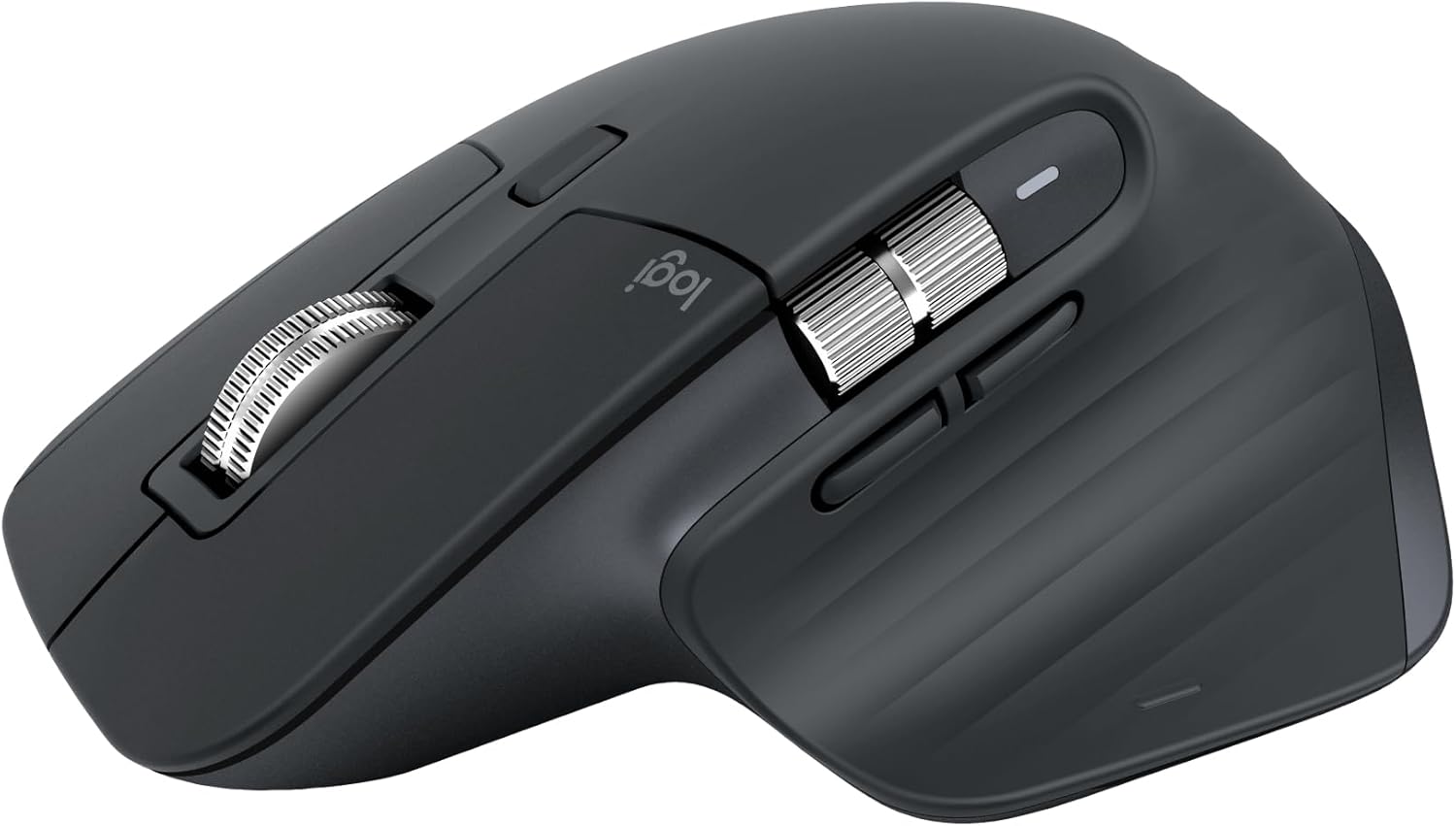
Premium · right-handed · Bluetooth or Logi Bolt · 8,000 DPI sensor that tracks on glass · MagSpeed wheel plus thumb wheel · Quiet Clicks · up to 3 devices · sold by Amazon · £67.99 (RRP £84.99)
For most people working from a spare room or the kitchen table, the 3S is the better buy than the 4. You get the same sculpted right-hand shape, the MagSpeed scroll wheel, the thumb wheel and Quiet Clicks, and it was £67.99 against a £84.99 RRP when we checked.
The 8,000 DPI sensor tracks on glass, so it works on a glass desk or a kitchen table without a mat. Easy-Switch handles up to three devices, and Logitech’s Flow software lets you move the cursor from a work laptop to a home PC on the same desk.
What you give up compared with the 4 is the haptic panel and Actions Ring, and the USB-C receiver. The 3S uses Logitech’s Bolt receiver or Bluetooth.
A note on listings: this one is sold by Amazon and marked ‘Mouse alone’. The older 3S listing with over 15,000 ratings was only showing an Amazon Resale offer when we checked, so make sure you’re buying new if that matters to you.
✅ Same core comfort as the MX Master 4 for less
✅ Tracks on glass
✅ Three-device switching
✅ Sold by Amazon
❌ Large for small hands
❌ No haptics or USB-C receiver
❌ Right-handed only
The 57-Degree Handshake: Logitech MX Vertical Ergonomic Mouse

Premium · right-handed vertical · 57° angle · Bluetooth or USB Unifying receiver · 4,000 DPI with cursor speed button · up to 3 devices · rechargeable, up to 4 months per charge · sold by Amazon · £59.17 (RRP £92.99)
A vertical mouse turns your hand onto its side, like a handshake, so your forearm isn’t twisted flat. The MX Vertical tilts to 57 degrees, and Logitech says the position reduces muscle activity by 10% compared with a standard mouse. Some people find that may feel more comfortable over a long day. Others never get on with it, so buy from somewhere with easy returns.
It’s the premium vertical option, and it feels like one. The 4,000 DPI sensor has a cursor speed button, Easy-Switch handles up to three devices, and the battery lasts up to four months per charge, with a one-minute quick charge giving about three hours.
It’s bigger than the Logitech Lift below, so it suits medium to large hands. It also uses the older Unifying receiver, not Bolt, which only matters if you’re trying to run everything off one dongle.
It was £59.17 against a £92.99 RRP when we checked and sold by Amazon, with over 14,000 ratings.
✅ Natural handshake angle
✅ Rechargeable with quick charge
✅ Three-device switching
✅ Big discount on RRP when checked
❌ Too big for small hands
❌ Uses the older Unifying receiver
❌ Vertical grips take time to adjust to
The Laptop Bag Mouse: Logitech MX Anywhere 3S Compact Wireless Mouse

Best Value · compact · Bluetooth (Logi Bolt compatible, receiver not included) · 8,000 DPI, tracks on glass · MagSpeed wheel · Quiet Clicks · up to 3 devices · up to 70 days per charge, USB-C · sold by Amazon · £55.99 (RRP £79.99)
If you split the week between home and the office, or work from trains and cafés, the MX Anywhere 3S is the MX mouse that fits in a pocket. It has the MagSpeed wheel, the 8,000 DPI sensor that tracks on glass and Quiet Clicks, in a much smaller body.
Smaller is the trade-off. It’s comfortable for fingertip and claw grips, and for smaller hands, but there’s no thumb shelf or side wheel, so it’s less of an ergonomic mouse than the Master. Think of it as the portable partner to a Master or vertical mouse at home.
It connects over Bluetooth to up to three devices and works with a Logi Bolt receiver, though one isn’t in the box. It charges over USB-C, lasts up to 70 days per charge, and a one-minute charge gives about three hours.
At £55.99 against a £79.99 RRP, sold by Amazon, it’s a fair price already.
✅ Small enough for any laptop bag
✅ Tracks on glass
✅ USB-C charging
✅ Quiet clicks
❌ No thumb rest
❌ Bolt receiver costs extra
❌ Small for big hands
The Small-Hand Vertical: Logitech Lift Vertical Ergonomic Mouse

Best Value · vertical, 57° · right-handed (Lift Left version available) · small to medium hands · Bluetooth or Logi Bolt · quiet clicks · SmartWheel · 1 x AA, up to 24 months (listing) · sold by JM-Marketplace-UK · £42.79
The Lift is Logitech’s vertical mouse for small to medium hands, and it’s the one to look at if the MX Vertical sounds too big. It sits at the same 57-degree angle, with a soft-textured grip, a thumb rest and whisper-quiet clicks.
It connects over Bluetooth or a Logi Bolt receiver and runs on one AA battery, which Logitech’s listing puts at up to two years. If you’d rather not buy disposables, our rechargeable AA battery guide has a few that hold their charge in a drawer.
This is also the easiest proper left-handed ergonomic mouse to buy. The Logitech Lift Left is a mirrored version, sold by Amazon at £42.99 when we checked. Left-handers otherwise get a thin choice at the premium end, since the MX Master and MX Vertical are right-handed only.
One caution: the right-handed Lift listing was being sold by a third-party seller, JM-Marketplace-UK, with 13 left when we checked. Other colour listings were £42.99.
✅ Made for smaller hands
✅ Left-handed version exists
✅ Bluetooth or Bolt
✅ Very quiet clicks
❌ Runs on AA batteries
❌ Third-party seller on this listing
❌ Too small for large hands
The Stay-Still Trackball: Logitech ERGO M575S Wireless Trackball Mouse
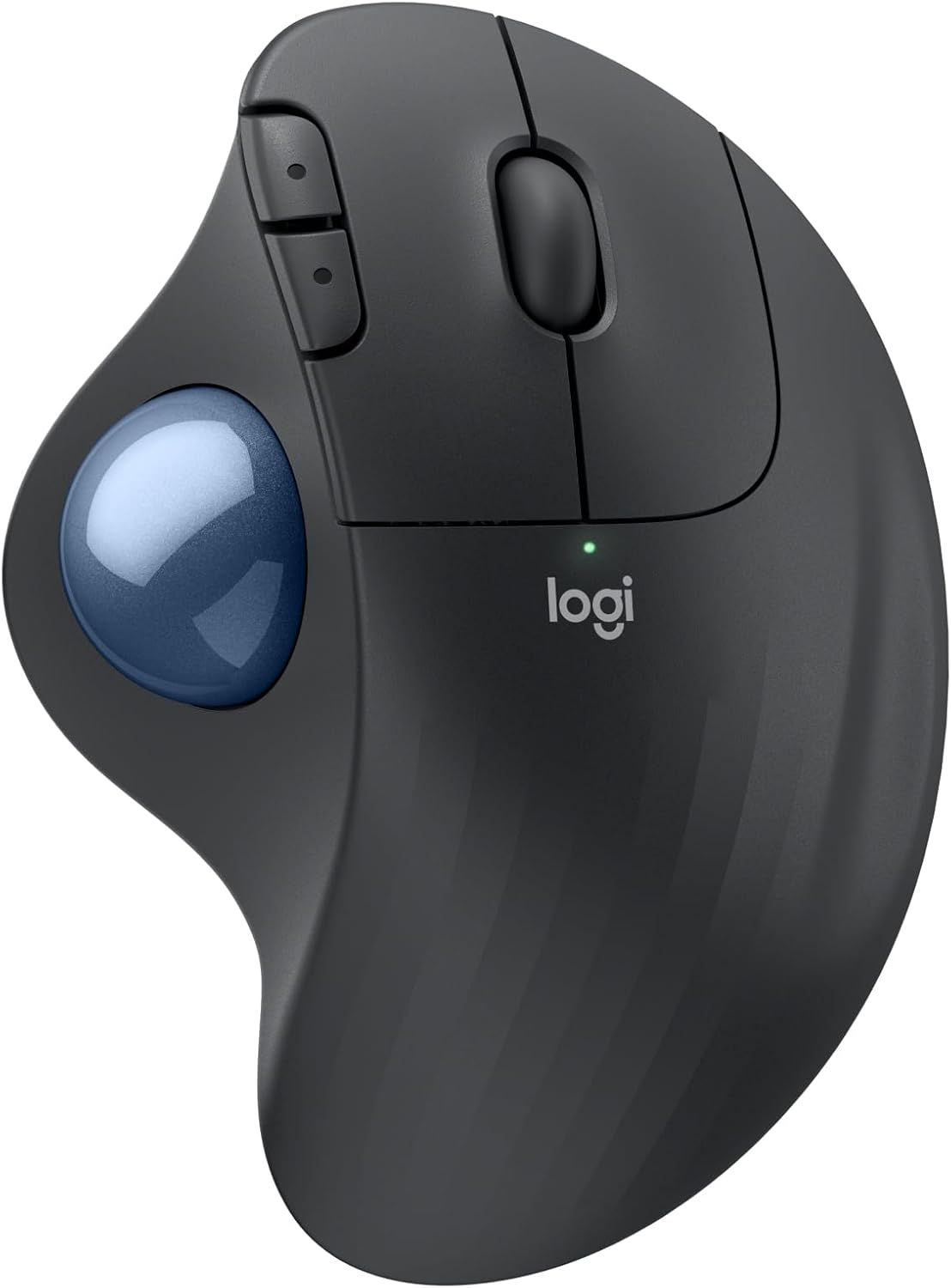
Best Value · thumb trackball · Bluetooth Low Energy or Logi Bolt receiver (included) · 80% quieter clicks (Logitech) · up to 18 months on one battery (included) · 3 customisable buttons · sold by Amazon · £29.99 (RRP £44.99)
A trackball flips the idea round. The mouse stays put and your thumb rolls the ball, so your wrist and arm don’t travel across the desk. That’s handy on a small desk or a sofa arm, and it works on any surface because the body doesn’t move.
The M575S is Logitech’s updated version of the M575, and it’s the cheapest way into a proper branded trackball. It connects over Bluetooth Low Energy or the Logi Bolt receiver that comes in the box, Logitech says its clicks are 80% quieter, and one battery lasts up to 18 months.
The first few days are clumsy. Fine control with a thumb takes practice, and if you do detailed photo editing you may want the MX Master instead. Clean the ball every so often too, because skin oil makes it sticky.
It was £29.99 against a £44.99 RRP when we checked, sold by Amazon. Another colour listing was £33.99. The listing’s spec table says ‘Left’ for hand orientation, but the shape and photos are right-handed, so don’t buy it as a left-hand mouse.
✅ Arm stays still
✅ Works on any surface or small desk
✅ Receiver included
✅ Cheap for a branded trackball
❌ Thumb control has a learning curve
❌ Right-handed shape despite the listing
❌ Ball needs regular cleaning
The Quiet Office All-Rounder: Logitech Signature M650 Wireless Mouse

Best Value · contoured, small to medium hands (M650 L for large hands) · Bluetooth or Logi Bolt · SilentTouch, 90% less click noise (Logitech) · SmartWheel · 1 x AA, up to 24 months · sold by Amazon · £24.49 (RRP £39.99)
Not everyone wants to relearn how to hold a mouse. The Signature M650 is a normal-looking mouse with a contoured shape, a soft thumb area and rubber side grips, and it’s the cheapest Logitech here with the features people actually notice day to day.
Those are SilentTouch clicks, which Logitech says cut click noise by 90%, a SmartWheel that switches between line-by-line and fast free-spin scrolling, and Bluetooth or Logi Bolt connection. One AA battery lasts up to two years.
This listing is the small-to-medium size. There’s an M650 L for large hands at about the same price, and Logitech sells a left-handed version too. It doesn’t switch between three devices like the MX range.
It was £24.49 against a £39.99 RRP when we checked, sold by Amazon, with over 12,000 ratings.
✅ Very quiet clicks
✅ Size options, including large
✅ Long AA battery life
✅ Sold by Amazon
❌ No multi-device switching button
❌ Flat-ish shape, not vertical
The budget verticals: worth trying before you spend more
A vertical grip doesn’t suit everyone, and the only way to know is to use one for a couple of weeks. These three cost less than £25, so they’re a cheap way to find out before buying a Lift or MX Vertical. None of them has Logitech’s software, and the clicks and scroll wheels feel cheaper.
The Rechargeable Budget Vertical: ProtoArc EM11 NL Wireless Ergonomic Vertical Mouse

Budget · vertical with extended wrist rest · Bluetooth 5.0 + 2.4GHz USB · up to 3 devices · built-in 500mAh battery, USB-C charging · 1000/1600/2400 DPI · quiet clicks · small to medium hands · sold by ProtoArc – Official · £22.99
If you want to try a vertical mouse without spending £40, this is the one we’d pick first. It’s rechargeable over USB-C, connects over Bluetooth 5.0 or a 2.4GHz receiver, and switches between up to three devices with a button, which is more than the Anker below manages.
The shape has an extended wrist rest that your palm sits on, and ProtoArc says it’s for medium to small hands, with a palm size of up to 19cm. Measure before you buy. ProtoArc also says a vertical mouse can take one to two weeks to get used to, which is an honest note to put on a listing.
The limits are clear on the listing: buttons aren’t programmable, and the forward and back buttons don’t work on a Mac. DPI tops out at 2,400, fine for office work.
It’s sold by ProtoArc’s own store and had over 5,000 ratings when we checked.
✅ Rechargeable over USB-C
✅ Three-device switching
✅ Wrist rest built in
✅ Cheap way to test vertical
❌ Buttons not programmable
❌ Side buttons don’t work on Mac
❌ Not for large hands
The Old Faithful: Anker 2.4G Wireless Vertical Ergonomic Optical Mouse

Budget · vertical · 2.4GHz USB receiver only (stored in the base) · 800/1200/1600 DPI · 5 buttons · 2 x AAA (not included) · 18-month warranty · sold by AnkerDirect UK · £16.98 (RRP £22.99)
The Anker vertical mouse has been on Amazon UK for years and had over 52,000 ratings when we checked, by far the most here. It’s a simple handshake-grip vertical with five buttons, including next and previous for browsing.
It’s basic in every other way. It connects only through a 2.4GHz USB-A receiver, which tucks into the base, so there’s no Bluetooth and no switching between devices. DPI goes from 800 to 1,600. It takes two AAA batteries, which aren’t included, so add a pack to the basket.
To save power it switches off after eight minutes idle, and you press a button to wake it. That’s fine at a desk but mildly annoying if you step away often.
It was £16.98, sold by AnkerDirect UK, and comes with an 18-month warranty.
✅ Huge number of ratings
✅ Cheap way to try a vertical grip
✅ Receiver stores in the mouse
✅ 18-month warranty
❌ USB-A receiver only, no Bluetooth
❌ Batteries not included
❌ Needs a click to wake after idling
The Big-Hand Budget Vertical: UGREEN Ergonomic Wireless Vertical Mouse

Budget · vertical, 57° · Bluetooth 5.4 + 2.4GHz USB-A · up to 3 devices · 4,000 DPI (not for glass) · 1 x AA, up to 12 months (not included) · medium to large hands · sold by UGREEN GROUP LIMITED UK · £15.49
UGREEN’s vertical mouse is the cheapest pick here and the better budget choice if your hands are on the large side. UGREEN sizes it for right hands over 17.5cm long, at the same 57-degree angle as Logitech’s verticals.
It’s well specified for £15.49: Bluetooth 5.4 and a 2.4GHz receiver, up to three devices, and a 4,000 DPI sensor. UGREEN is upfront that it doesn’t track on glass and that middle-click is unavailable on macOS, Linux and iOS.
It runs on one AA battery, which isn’t included, for up to 12 months according to UGREEN. Like ProtoArc, UGREEN suggests giving a vertical grip one to two weeks before deciding.
It’s sold by UGREEN’s own UK store. It had about 3,800 ratings when we checked, fewer than the Anker but enough to judge by.
✅ Cheapest pick here
✅ Bluetooth plus receiver, three devices
✅ Sized for bigger hands
✅ Sold by the brand
❌ AA battery not included
❌ No glass tracking
❌ Mac middle-click unsupported
Quick comparison
| Pick | Tier | Price checked | Best for | Note | Amazon |
|---|---|---|---|---|---|
| Logitech MX Master 4 Ergonomic Wireless Mouse | Premium | £102.50 | Heavy multitaskers, creative apps | Pricey; Windows 11 or macOS 13+ | View |
| Logitech MX Master 3S Performance Wireless Mouse | Premium | £67.99 | Most home workers | Our pick for most desks | View |
| Logitech MX Vertical Ergonomic Mouse | Premium | £59.17 | Vertical grip for bigger hands | Unifying receiver, not Bolt | View |
| Logitech MX Anywhere 3S Compact Wireless Mouse | Best Value | £55.99 | Travel, hot-desking, smaller hands | Not a full palm rest | View |
| Logitech Lift Vertical Ergonomic Mouse | Best Value | £42.79 | Small to medium hands, left-handers | Left-hand version sold by Amazon | View |
| Logitech ERGO M575S Wireless Trackball Mouse | Best Value | £29.99 | Small desks, staying still | Thumb control takes practice | View |
| Logitech Signature M650 Wireless Mouse | Best Value | £24.49 | Quiet clicks on a budget | Not a true ergonomic shape | View |
| ProtoArc EM11 NL Wireless Ergonomic Vertical Mouse | Budget | £22.99 | Cheap vertical, no batteries | Buttons aren’t programmable | View |
| Anker 2.4G Wireless Vertical Ergonomic Optical Mouse | Budget | £16.98 | Trying vertical for under £20 | No Bluetooth; batteries not included | View |
| UGREEN Ergonomic Wireless Vertical Mouse | Budget | £15.49 | Larger hands on a budget | AA battery not included | View |
Prices and sellers as shown on each Amazon UK listing on 26 October 2026 (London delivery address, VAT included). Specs and battery life are as stated by each maker.
Related guides
- Wireless mechanical keyboards in 75% and TKL for crowded desks
- Ergonomic office chairs with proper lumbar support
- Monitor light bars for dark winter desks
- Electric sit-stand desks vs desk converters
FAQs
Is a vertical mouse or a trackball better for wrist comfort?
They suit different people. A vertical mouse keeps your hand in a handshake position, which some people find may feel more comfortable over a long day. A trackball keeps your arm still and moves the cursor with your thumb, which helps on small desks. Neither is a medical treatment, so if you have pain, speak to a GP or physiotherapist.
Should I buy an ergonomic mouse now or wait for Black Friday?
Black Friday is on 27 November. Several picks here were already well below RRP when we checked, including the MX Master 3S at £67.99 and the MX Vertical at £59.17. If one of those prices suits you, there’s little reason to wait. Amazon hadn’t confirmed when its Black Friday deals start when we checked.
What’s the difference between Bluetooth and a Logi Bolt receiver?
Bluetooth needs no dongle and is best for laptops and tablets. Logi Bolt is Logitech’s USB receiver, which can be more reliable in busy offices with lots of wireless kit. The MX Master 3S, Lift, M575S and M650 work with both. The MX Master 4 uses a USB-C receiver, and the MX Vertical uses the older Unifying receiver.
Is there a good left-handed ergonomic mouse?
The Logitech Lift Left is the easiest one to buy. It’s a mirrored Lift, sold by Amazon at £42.99 when we checked. Perixx also makes left-handed vertical mice. The MX Master range and the M575S trackball are right-handed.
Can one mouse switch between my work laptop and home PC?
Yes. The MX Master 4 and 3S, MX Anywhere 3S, MX Vertical, ProtoArc EM11 NL and UGREEN vertical all pair with up to three devices and switch with a button. The Anker uses a single USB receiver and can’t.
Final Thoughts 💡
For most home workers, the Logitech MX Master 3S at £67.99 is the one to buy. It’s comfortable from day one, it’s quiet, and it switches between three computers. Pay the extra for the MX Master 4 only if you’ll use the haptic shortcuts in creative apps. If you want to try a vertical grip, the Logitech Lift suits smaller hands and comes in a left-handed version, and the MX Vertical suits bigger ones.
On a tight budget, the ProtoArc EM11 NL is a rechargeable vertical mouse for £22.99, and the M575S trackball at £29.99 is the pick for small desks. Then sort the light, because a dim desk makes a long day feel longer: our monitor light bar guide covers that.
For more buying guides and live deals, head to Hotuk.deals.
Disclosure: Hotuk.deals is a participant in the Amazon EU Associates Programme, an affiliate advertising programme designed to provide a means for sites to earn advertising fees by advertising and linking to Amazon.co.uk. As an Amazon Associate we earn from qualifying purchases. Prices and availability change; always confirm on Amazon before you buy.